
Deploy Web
Deploy the TanStack Start web app to Cloudflare Workers
Deploy Web (Cloudflare Workers)
EasyStarter's web app is built with TanStack Start and runs in SSR mode on Cloudflare Workers. The Web Worker connects to the Server Worker via Service Bindings — no public network hop required.
You must complete the Server deployment before deploying the web app. Service Bindings require the Server Worker to already exist.
EasyStarter supports two deployment methods — choose the one that fits your workflow:
| Method | Best for |
|---|---|
| Option 1: Local CLI | Quick launch, one-off deploys, full manual control |
| Option 2: GitHub auto-deploy | Continuous delivery, team collaboration, deploy on push |
Option 1: Local CLI deploy
Authenticate Wrangler locally, then run the deploy commands manually.
npx wrangler loginEnvironment variable overview
All web app variables are VITE_-prefixed public config — Vite injects them into the client bundle at build time. For local CLI deploys, put them in wrangler.jsonc vars; for CI / remote deploys, also configure them in the platform's build environment variables.
| Type | File | Description |
|---|---|---|
| Local development | apps/web/.env.development | Auto-loaded by wrangler dev, points to localhost |
| Local production deploy | apps/web/wrangler.jsonc → vars | Compiled into the Worker bundle at deploy time |
| CI / remote deploy | CI build environment variables / secrets | Add every variable from apps/web/.env.production |
The web app does not use
wrangler secret bulk.apps/web/.env.productioncan be used as the production build variable checklist; for CI / remote deploys, add those values to the platform's build environment variables or secrets.
If the production variable checklist doesn't exist yet, copy the template first:
cp apps/web/.env.production.example apps/web/.env.productionThen fill apps/web/.env.production with the production VITE_ variables. This file is not used by wrangler secret bulk; it is mainly a checklist for syncing values into CI / remote deploy build environment variables.
Update apps/web/wrangler.jsonc
Fill in the Worker name, Server Service Binding, and public variables:
{
  "name": "your-web-worker",            // Web Worker name — must be globally unique
  "compatibility_date": "2025-09-02",
  "compatibility_flags": ["nodejs_compat"],
  "main": "@tanstack/react-start/server-entry",
  "assets": {
    "not_found_handling": "single-page-application"
  },
  "services": [
    {
      "binding": "API_SERVICE",
      "service": "your-server-worker"   // must exactly match the name in Server's wrangler.jsonc
    }
  ],
  "vars": {
    "VITE_SERVER_URL": "https://your-server-worker.your-subdomain.workers.dev",
    "VITE_APP_URL": "https://your-web-worker.your-subdomain.workers.dev"
  }
}| Field | Description |
|---|---|
name | Web Worker name — determines the default access URL |
services[0].service | Must exactly match the Server's name — the Service Binding won't work otherwise |
vars.VITE_SERVER_URL | Server address — used by the oRPC client and Better Auth client |
vars.VITE_APP_URL | Web app's own address — used for SEO canonical URLs, OAuth callbacks, etc. |
Deploy the Web Worker
pnpm deploy:webWrangler runs vite build to produce the SSR output, then publishes it to Cloudflare Workers.
On success, the console prints the Worker URL:
Deployed your-web-worker triggers:
https://your-web-worker.your-subdomain.workers.dev
Verify the deployment
Visit the Web Worker URL and confirm the following work correctly:
- Homepage loads
- User sign-up / sign-in (email + OAuth)
- Payment checkout flow (requires Stripe to be configured)
- File uploads (requires R2 to be configured)
Option 2: GitHub auto-deploy
Connect your GitHub repository to Cloudflare so every push to the target branch automatically triggers a build and deploy.
The web app does not use Workers Secrets, but GitHub auto-deploy still needs build configuration and build environment variables.
Connect your GitHub repository
- Go to Cloudflare Dashboard → Workers & Pages
- Click Create → Workers → Connect to Git
- Authorize Cloudflare to access your GitHub account and select your repository
- Choose the deployment branch (usually
master)
Enter the build configuration
Fill in the following settings on the build configuration page:
| Field | Value |
|---|---|
| Root directory | / |
| Build command | pnpm --filter web build |
| Deploy command | pnpm --filter web run deploy |
| Version command | pnpm --filter web run deploy |
Root directory is
/because this is a monorepo — pnpm workspaces must resolve dependencies from the repo root.
For CI / remote deploys, do not rely on a local apps/web/.env.production file. Add every variable from apps/web/.env.production to the CI build environment; when the platform separates variables and secrets, put public config in build variables and sensitive values in build secrets.
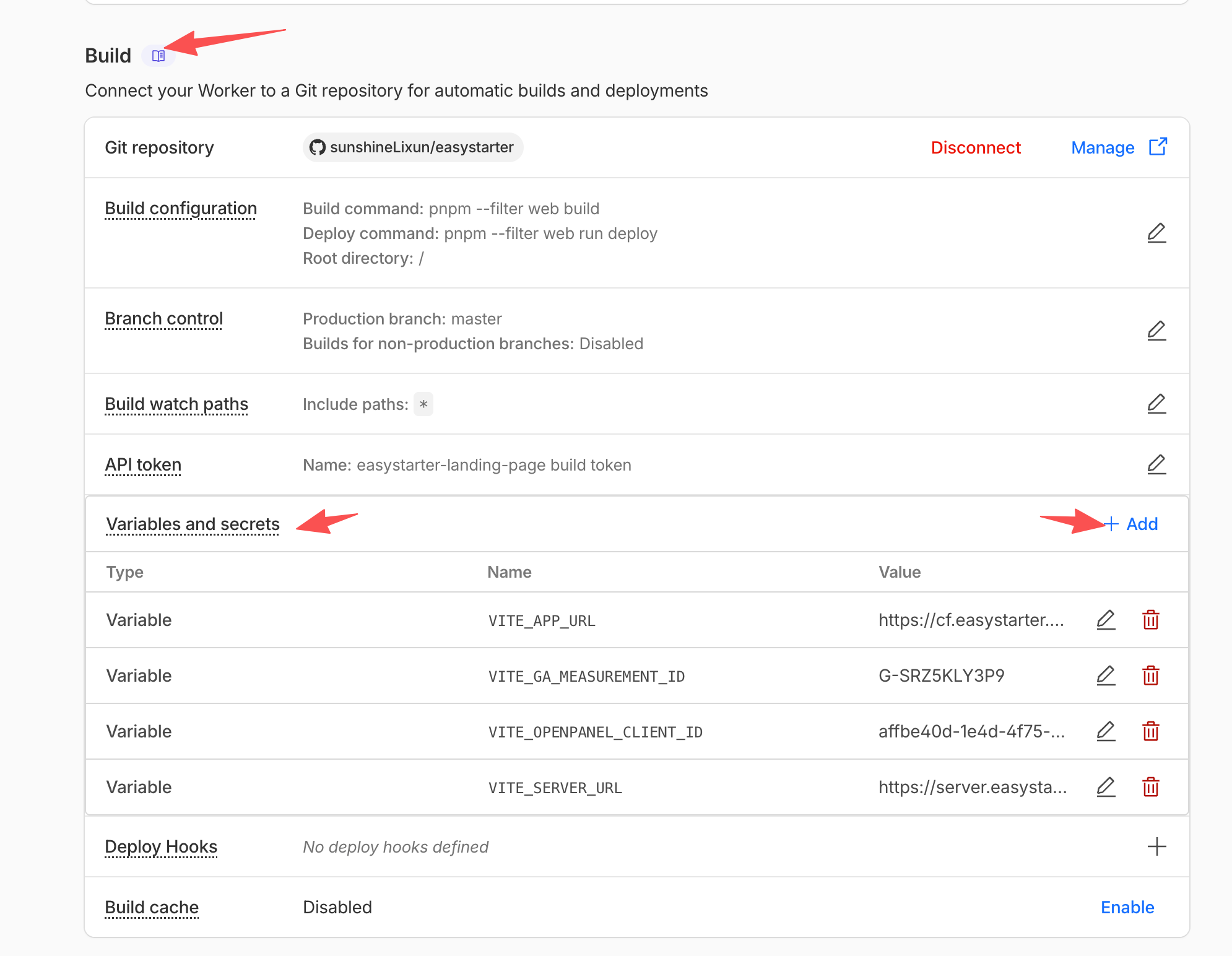
Disable non-production branch deployments
After saving the build configuration, disable non-production branch builds.
This step is mandatory. The web Worker uses a fixed name — a non-production branch build overwrites the same Worker, replacing the live web app with unfinished code. Because the web Worker is bound to the server Worker via Service Bindings, a mismatched deploy can also break the API connection.
Once configured, every push to the target branch automatically triggers a new build and deployment. View the status and logs for each deploy under Workers & Pages → your Worker → Deployments.
Custom domain (recommended)
- Go to Cloudflare Dashboard → Workers & Pages → select your Web Worker
- Go to Settings → Domains & Routes
- Click Add Custom Domain and enter your domain (must be hosted on Cloudflare), e.g.
app.yourdomain.com - Once bound, update the related config as described below
Why multiple files need to be updated
VITE_APP_URL and VITE_SERVER_URL live in wrangler.jsonc vars and are compiled into the Worker bundle at build time. Changing them requires a redeploy to take effect.
The server also references WEBSITE_URL (Better Auth trusted origins). If the web domain changes, the server config must be updated too — otherwise auth requests will be blocked by CORS.
Files to update
① apps/web/wrangler.jsonc
"vars": {
  "VITE_SERVER_URL": "https://api.yourdomain.com",  // matches the server custom domain
  "VITE_APP_URL": "https://app.yourdomain.com"      // the new web custom domain
}
② apps/server/wrangler.jsonc
"vars": {
  "WEBSITE_URL": "https://app.yourdomain.com",       // sync to the new web domain
  "SERVER_URL": "https://api.yourdomain.com"
}
Redeploy to apply the changes
Both apps have changes, so deploy both:
pnpm deployThis runs pnpm deploy:server followed by pnpm deploy:web.
varsare static config compiled into the bundle. Every change towrangler.jsoncvarsrequires a redeploy — updating secrets alone will not apply these changes.